Quick Drive and race setup
Start a hotlap, practice session or full race weekend in seconds, with deep control over weather, time of day, traffic and opponent difficulty.
Content Manager is the alternative launcher that turns Assetto Corsa into a modern sim — a faster menu, a real online browser and one-click Custom Shader Patch setup. This independent guide explains what it does and how to install it.
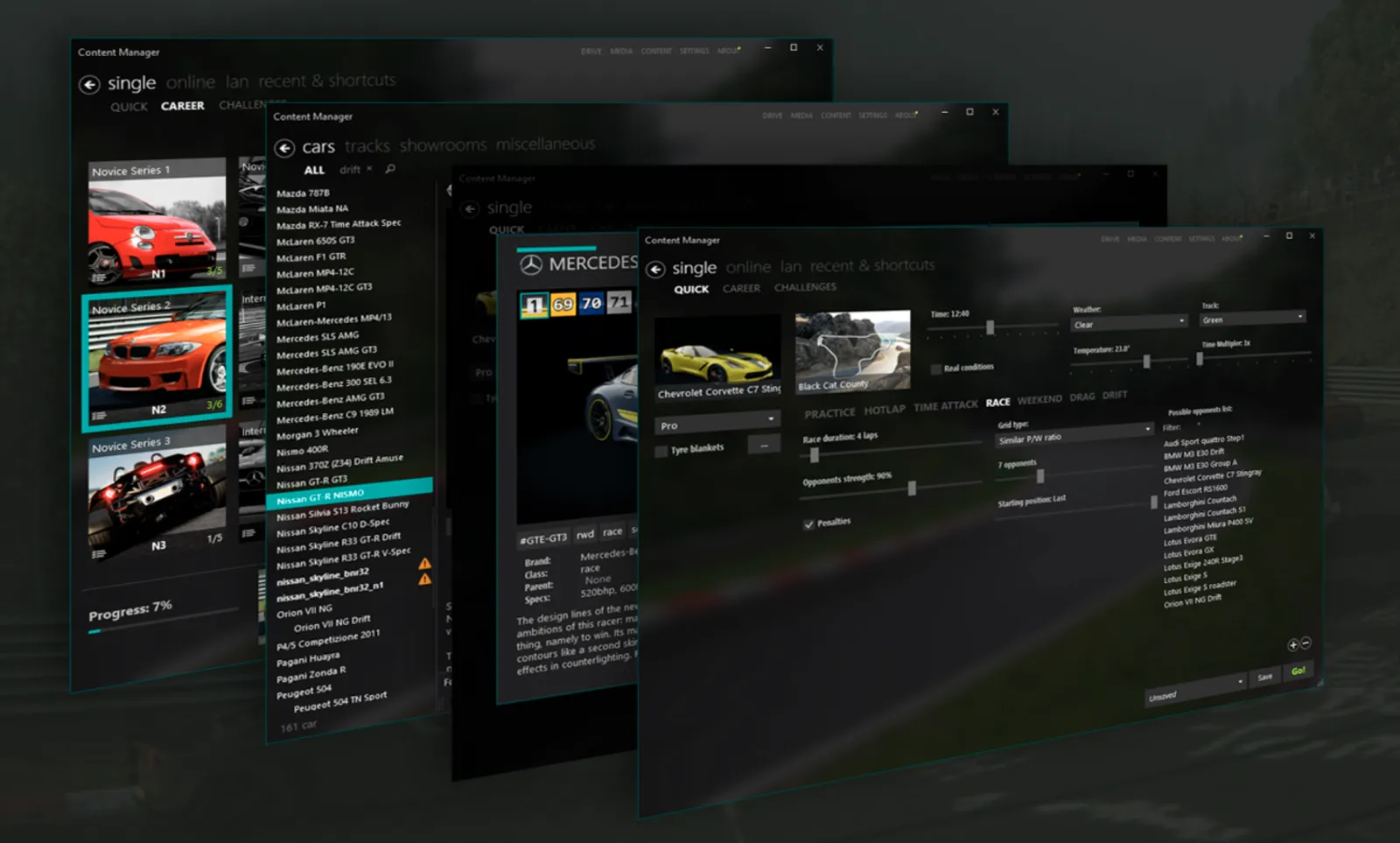
Content Manager is the single most important add-on for anyone serious about Assetto Corsa on PC. It is a free third-party application that completely replaces the basic launcher shipped with the game, giving you a faster, cleaner and far more capable way to browse cars, build races, join online servers and manage every mod you install. For most people it becomes the screen they see every time they sit down to drive.
If you have spent any time in the Assetto Corsa modding community, you have already come across it — this is the launcher nearly every guide, server and mod pack assumes you are running. This page is an independent, plain-English guide to the app: what it actually does, how it compares to the stock launcher, the difference between the free and paid versions, and how it works alongside Custom Shader Patch. When you are ready to set it up, our step-by-step installation guide walks you through downloading Content Manager from the official source.
Content Manager is an alternative launcher and content-management tool for Assetto Corsa, the PC racing simulator developed by Kunos Simulazioni. It was created by the developer known as x4fab and is distributed through assettocorsa.club. Rather than being a mod that changes how cars drive, it is the layer you interact with before and around your driving — the menu, the server browser, the settings panels and the library of everything installed in your game.
When you launch Assetto Corsa normally, you get the original Kunos launcher: a simple window for picking a car and track and starting a session. That launcher works, but it has barely changed since the game's early days. Content Manager takes over its role entirely. It scans your installation, indexes every car, track, skin, app and weather mod, and presents them in a fast, searchable interface. From the same window you can start a quick race, set up a full weekend with practice and qualifying, browse thousands of online servers, watch replays, manage controller settings and update mods.
Because it reads directly from your Assetto Corsa folders, it does not replace the game itself. Assetto Corsa still handles the driving, the physics and the actual racing; the app simply becomes the front end. That distinction matters: you still need a legitimate, installed copy of the game for it to work, and the app is Windows-only, like the sim it supports. For most players, Content Manager quickly stops feeling optional — the modding scene has built itself around it, and once you have used the interface for a week, returning to the stock launcher feels like a real downgrade.
Content Manager replaces the default Assetto Corsa launcher because the stock launcher, though functional, is minimal — it was built for a smaller game and never kept pace with the enormous modding ecosystem that grew up around the sim. Content Manager closes that gap, and the difference is obvious within minutes of switching. Here is what you actually gain.
Speed and search. Content Manager loads your content library almost instantly and lets you search and filter cars and tracks by name, class, tag, brand or country. With a few hundred mods installed — completely normal for an active player — the stock launcher becomes slow and awkward to navigate. The replacement stays quick no matter how large your collection grows.
A real online browser. The built-in server list is the single biggest reason most people install it. You can see every public Assetto Corsa server, filter by ping, track, car or player count, sort by how busy each one is, and join with one click.
Race setup and a control panel. You get far more control over single-player sessions — practice and qualifying lengths, weather, opponent strength, penalties and grids — and Content Manager doubles as a control panel for video, audio and controller settings. The table below summarises how the two launchers compare.
| Capability | Default launcher | Content Manager |
|---|---|---|
| Online server browser | Basic | Full filtering, sorting and 1-click join |
| Search and filtering | Limited | By name, class, tag, brand and country |
| Auto-download of server content | No | Yes, where the server allows it |
| Race and session setup | Minimal | Weather, time, traffic, penalties, presets |
| Custom Shader Patch install | No | Built-in installer and version manager |
| Skin and showroom management | No | Yes |
| Replay management | Basic | Rename, organise and advanced playback |
| Settings control panel | Basic | Video, audio, controls and force feedback |
There is a lot packed into a single window. These are the features Assetto Corsa players come to rely on most, and the ones that make Content Manager hard to give up once you are used to it.
In practice, six features do most of the work. Quick Drive and race setup let you start a hotlap or a full race weekend in seconds. The online server browser lists every public Assetto Corsa server with filtering and one-click join. The content library indexes every car, track and skin you own. A built-in Custom Shader Patch installer adds and updates the graphics mod for you. The settings control panel gathers video, audio and force-feedback options in one place. And the replay and showroom tools handle playback and photo capture. Each is covered in detail below — but together, these six are why most players treat Content Manager as the only way they open Assetto Corsa.
Start a hotlap, practice session or full race weekend in seconds, with deep control over weather, time of day, traffic and opponent difficulty.
Browse, filter and sort every public Assetto Corsa server, then join in one click — with optional automatic downloads for missing content.
Every car, track, skin and app you own, indexed and searchable, each with a detailed info page and one-click updates.
Install, update and configure CSP directly inside Content Manager — the graphics mod that modernises how Assetto Corsa looks.
Tune video, audio, controls and force feedback from clear, organised panels instead of scattered in-game menus.
Manage, rename and rewatch replays, and use the enhanced showroom and photo tools to capture your cars.
Beyond these headline features, Content Manager is full of quality-of-life touches: drag-and-drop mod installation, tidy organisation of skins and showrooms, automatic handling of updates, and tools for cleaning up broken or leftover content. It is actively maintained, and because such a large share of the Assetto Corsa player base uses it, almost every problem you might run into is already documented somewhere in a community forum or Discord server. None of this changes how a car feels on track — that is still pure Assetto Corsa — but it removes nearly all of the friction that used to sit between you and the next session.
Content Manager comes in two versions: a free version and a paid upgrade called Content Manager Full. Both are the same application — the Full upgrade simply unlocks additional features. You can use the free version for as long as you like, with no time limit and no nagging, and it already covers everything most players need: launching the game, the online server browser, content management, full race setup and Custom Shader Patch installation.
The Full upgrade adds convenience and presentation features aimed at enthusiasts. These typically include a custom showroom for inspecting cars in detail, tools for generating and bulk-updating custom car previews, faster game-start options, more detailed statistics and extra customisation throughout the interface. It is a one-time purchase rather than a subscription, it supports x4fab — the developer who builds and maintains Content Manager — and it carries across future updates.
Which should you choose? If you are new to all of this, start with the free version. It does not limit your driving in any way, and you can always decide later whether the extra features are worth it. Players who spend a lot of time organising large mod collections, creating content or capturing screenshots tend to find the upgrade pays for itself in saved time. More casual players are usually perfectly happy on the free version indefinitely.
Whichever you pick, only ever download the software from the official source, and only buy a Full key through the official channel. Third-party sites promising the paid version for free are exactly the kind of thing that turns out to be bundled with malware. Our free vs Full comparison lays out exactly what each version includes.
One of the biggest reasons to install Content Manager in the first place is Custom Shader Patch, almost always shortened to CSP. Custom Shader Patch is a separate modification that overhauls Assetto Corsa's ageing graphics engine, adding modern lighting, dynamic weather, rain, far better reflections and a long list of new visual effects. CSP is what makes the spectacular Assetto Corsa screenshots you see online possible — and Content Manager is the standard, recommended way to install and manage it.

Inside Content Manager there is a dedicated Custom Shader Patch section. From there you can install CSP, switch cleanly between different versions, and turn individual features on or off. The app handles the download and puts every file in the right place, so you never have to copy anything into the game directory by hand. It also works hand in hand with weather and lighting add-ons such as Sol or Pure, which build on top of CSP to deliver realistic skies, sunsets and full day-night cycles.
For new players, this is the recommended order: install Content Manager first, then use it to install a recent build of Custom Shader Patch, and finally add a weather mod if you want the complete visual experience. Setting things up in that sequence keeps every component in one place and makes it easy to roll back if a particular CSP build does not behave. Our full Custom Shader Patch guide walks through installing and managing CSP step by step.
If you want to race other people in Assetto Corsa, Content Manager is effectively required. The stock launcher's online options are bare-bones; the server browser built into the replacement is where the online community actually lives.
Open the Online section and you are shown a live list of public servers. You can filter by car, track, ping and the number of drivers currently connected, and sort the list to find a busy session or a quiet server to practise on alone. Each entry shows the server's rules, its required cars and tracks, and the session type. When you join a server that uses content you do not already own, Content Manager can download the missing cars or tracks for you automatically, wherever the server makes that content available.
It also remembers servers you have joined before, supports favourites and saved passwords, and works smoothly with the booking systems that organised leagues rely on. Many Assetto Corsa communities and racing leagues publish join links that open directly in Content Manager, so getting into an event is often a single click. Whether you stick to casual public lobbies or commit to structured league racing, this is the hub that ties all of it together. Our online racing guide covers the server browser in more depth.
Assetto Corsa's modding scene is enormous — thousands of cars and tracks, plus skins, apps and other extras — and without help, a large collection quickly becomes hard to keep track of. Managing exactly that is what Content Manager is built for. Every piece of content you install shows up in its library with its own details page, complete with specifications, author credits, available skins and version information.
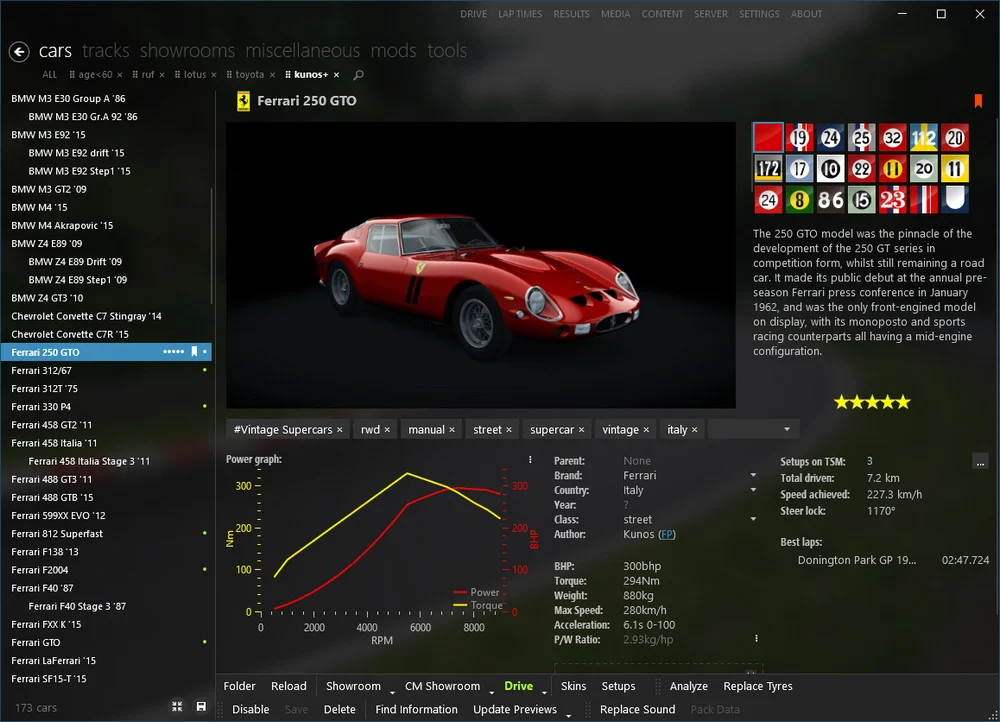
Installing mods is usually as simple as dragging an archive straight onto the window; the app works out whether it is a car, track, skin or app and places the files in the correct folders for you. It can update content in place, disable items you are not currently using without deleting them, and flag anything that is broken or missing a dependency before it causes a problem in-game.
The practical payoff is simple. Instead of digging around in the Assetto Corsa directories in Windows Explorer, you organise everything from one clear interface. This is exactly where the name comes from — Content Manager genuinely manages all of the content in your copy of the game, and it does the job far more reliably than the basic tools the base game ships with. Our guide to managing cars, tracks and mods goes further.
Content Manager is widely trusted across the Assetto Corsa community and has been the de facto launcher for the game for years. It is safe to use, with one important condition: download it only from the official source at assettocorsa.club, never from random mirrors, file-sharing sites or cracked bundles.
Two practical notes are worth knowing in advance. First, because Content Manager is a standalone executable rather than something from the Microsoft Store, Windows SmartScreen — or your antivirus — may show a warning the first time you run it. That is a generic caution shown for any less common program; it is not evidence that anything is wrong, and the file from the official source is the genuine, clean app. Second, only ever unlock the Full version with a key purchased through the official channel. Sites that promise the paid version for free are, by a wide margin, the most common way people end up with malware while trying to set up Assetto Corsa.
Setting Content Manager up is quick. You need Assetto Corsa already installed on a Windows PC; after that you download Content Manager from the official source, run it, and point it at your game folder. From there the app walks you through the remaining setup, and if you want the modern visuals, you can install Custom Shader Patch in just a few extra clicks.
Our full installation guide breaks every step down in order, including the SmartScreen warning on first launch, connecting the app to your Assetto Corsa folder, and replacing the default launcher so the game always opens straight into it. If all of this is new to you, follow that guide from start to finish — most people have everything up and running in well under five minutes. If you do hit a snag, our troubleshooting guide covers the common fixes.
Content Manager is a free third-party launcher and content-management app for Assetto Corsa, created by the developer x4fab. It replaces the default Kunos launcher with a faster interface for browsing cars and tracks, setting up races, joining online servers and managing mods.
Yes. The free version covers everything most players need, with no time limit. A paid upgrade, Content Manager Full, unlocks extra convenience and presentation features such as a custom showroom and bulk preview tools.
Technically no — Assetto Corsa runs with its original launcher. In practice the app is essential for online racing and modding, and almost every community guide assumes you are using it. Most players install it within their first day with the game.
Always download it from the official source, assettocorsa.club. Avoid unofficial mirrors and any site offering the paid version for free, as those are a common source of malware. Our installation guide links straight to the official download.
No. Content Manager is the launcher; Custom Shader Patch (CSP) is a separate graphics modification. They are used together — the app is the standard tool for installing and managing CSP — but they are two different projects.
Windows SmartScreen shows a generic caution for any program not widely distributed through the Microsoft Store. It is not specific evidence of a problem. As long as you downloaded the app from the official site, it is safe to allow it to run.
Follow our step-by-step installation guide — it links to the official download and gets you racing in a couple of minutes.
Open the installation guide